
Rob Swan
Localized Keyword Research for Map-Pack Visibility

You're staring at the same problem a lot of small-town trade owners hit after a site refresh or a GBP cleanup. One town looks strong in Google Maps, the next one drops off the board, and your keyword list doesn't explain why. That's usually the moment generic service plus city thinking breaks, because the fight is happening at the town-by-town level, not the city level.
Table of Contents
- Why Localized Keyword Research Is the Real Map-Pack Lever
- Building Your Seed List From Real Search Behavior
- Turning Seeds Into a Service by Town Grid
- Scoring Each Cell So Priorities Are Obvious
- Mapping Terms to GBP Assets and Live Map-Pack Checks
- Seasonal and Emergency Modifiers as a Separate Research Layer
- Turning the Grid Into a Quarterly Routine
Why Localized Keyword Research Is the Real Map-Pack Lever
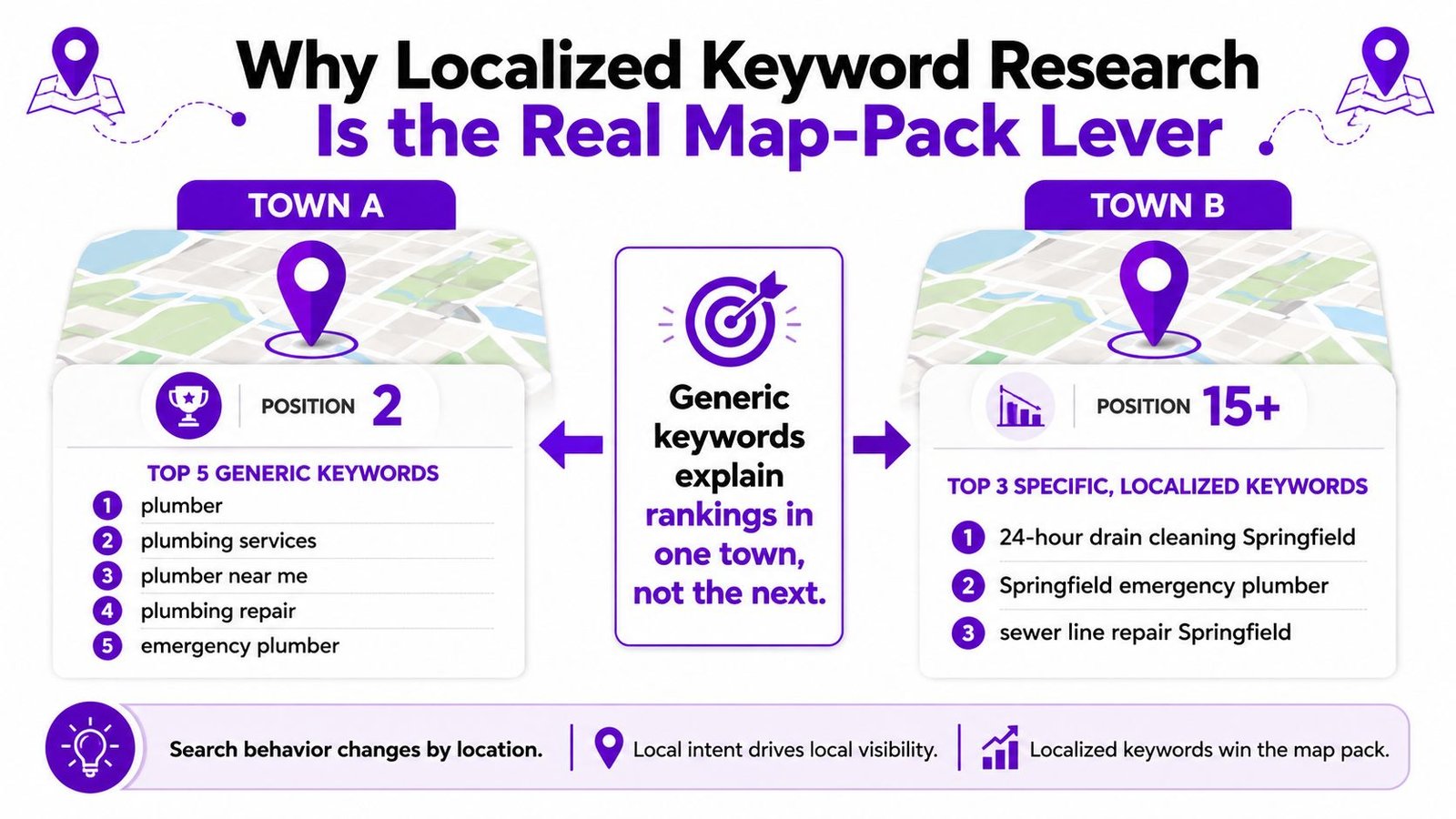
The reason generic keyword lists fail is simple. Map-pack visibility is decided by service, geography, and intent together, not by a broad city label that treats every nearby town as if it searches the same way. I've audited enough plumbing, HVAC, electrical, and roofing accounts to see the pattern repeat, one town gets the right query mix, the next town gets a different mix, and the same page can't serve both cleanly.
Localized keyword research fixes that mismatch by turning the business into a service-by-town grid. Instead of asking, “What keywords fit the business?” the better question is, “Which service terms match demand in each town we serve, and which map-pack result is Google showing there?” That shift matters because local search is heavily intent-driven, and the broader query environment includes a huge share of local behavior, with sources reporting 46% of all Google searches have local intent, 80% of local searches lead to conversions, and 76% of people who search locally on a phone visit a physical location within 24 hours. Those figures come from the benchmark summary on localized search demand, which also notes the scale of “near me” behavior and why town names, service-plus-city phrases, and urgency modifiers matter for planning. See the benchmark summary in localized keyword research statistics.
Practical rule: if a term doesn't show up in live local SERPs, Search Console, autocomplete, or calls, it's not part of your real market yet.
The grid changes the work in one more important way. It forces you to separate the towns where you win from the towns where you're guessing. That's exactly why a focused method often starts with a small cluster of high-intent terms and then checks them against the live map pack, instead of bloating a list with every nearby place name.
For a straight map-pack workflow, the most useful companion to this approach is a clean visibility audit like how to rank higher on Google Maps, because keyword research only matters once you know where the business is visible, and where it's not.
Building Your Seed List From Real Search Behavior

The cleanest seed list comes from behavior you can already see, not from a whiteboard session. Start with the queries already touching your property, then widen just enough to cover the way nearby customers phrase the job.
Pull from the data you already own
Google Search Console is the fastest place to start if the GBP landing page or service pages already get impressions. Look for queries that include service terms, nearby towns, and emergency language, then strip out branded searches unless you're specifically mapping brand demand. After that, review GBP insights and the phrases that led to calls, messages, and website visits, because those terms often reflect how people describe the problem, not how marketers label it.
Customers don't call for “commercial HVAC maintenance,” they call because the furnace is making noise, the drain is backed up, or the breaker keeps tripping. Your seed list should sound like that.
Expand with search behavior, not guesses
Use Google autocomplete for each service and town combination, and pay attention to the modifiers people naturally add, especially time-sensitive phrases and location words that show up repeatedly. Then review call logs and form submissions for repeated wording, because front-desk notes often reveal the exact phrases customers use before they ever reach the website. If the same phrase appears in Search Console, autocomplete, and calls, it belongs in the seed set.
A tight cleaning pass matters here:
- Remove duplicates so “drain cleaning” and “drain cleaning service” don't get treated as separate strategic terms when they're really the same intent.
- Drop branded queries unless the goal is brand protection or reputation management.
- Normalize town names so you're comparing the same place consistently across sheets and tools.
- Keep service language plain so you don't inflate the list with jargon nobody in the town uses.
The goal is a working seed set, usually 50 to 150 phrases in practice for a multi-town trade business, but the point isn't the count. The point is that every term came from observed market behavior, so the next step is about sorting signal, not brainstorming more noise.
Turning Seeds Into a Service by Town Grid
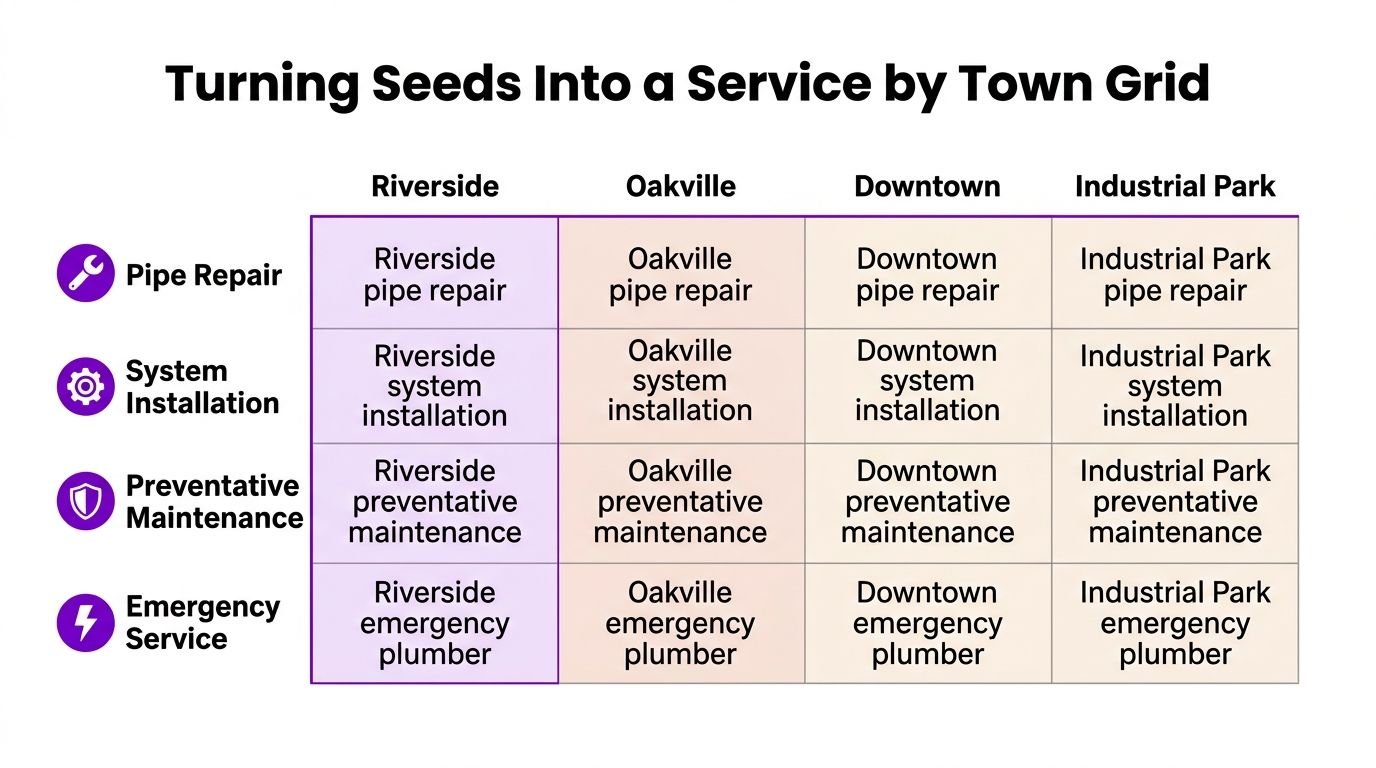
A useful grid has two axes. Rows are the core services, such as repair, installation, maintenance, and emergency. Columns are the actual towns the business serves, not every neighborhood or ZIP code someone threw into a spreadsheet because it looked complete.
Choose the towns that deserve a column
Include towns where the business already has customers, towns covered by the Google Business Profile service area, and towns where competitors are visibly weak in the map pack. Drop places that don't generate meaningful demand, especially when the only reason they're in the list is that a ZIP code exists. That's how teams end up creating content for places customers never search for in the first place.
For service-area businesses, town-by-town demand capture beats neighborhood stuffing. A single city page usually flattens real variation, while a well-built grid shows where one town wants repair language, another wants emergency language, and a third mostly needs maintenance terms.
Fill the cells with actual search phrasing
A simple HVAC example makes the structure obvious. Put repair, install, maintenance, and emergency down the side, then add towns like Riverside, Oakville, Downtown, and Industrial Park across the top. A cell might contain “Riverside AC repair” or “Oakville furnace installation,” while another may stay blank if there's no evidence the town supports that kind of search.
Blank cells are useful. They tell you where you're missing evidence, where Search Console has nothing to back up a page, or where the local SERP doesn't justify a separate target. That's better than fabricating a keyword because it looks symmetrical in a deck.
Use the grid to spot real coverage gaps
If Riverside has repair and emergency terms but not maintenance, that isn't an editing problem, it's a demand question. If Oakville only returns directory results and no map-pack visibility, that points to a different asset and a different level of competition. The matrix helps you see both the market and the gap at the same time, which is why it's more useful than a long list sorted alphabetically.
Scoring Each Cell So Priorities Are Obvious
Once the grid exists, the next question is not “Can we rank for this?” It's “Should we spend time on this first?” That's where a simple scoring model keeps the team from overvaluing the biggest-looking keyword and underpricing the one that turns into jobs.
Score for intent, not volume alone
A practical framework uses five inputs, search volume, local-intent match, difficulty, conversion value, and strategic relevance. A common scoring model assigns 0 to 3 for the first four inputs, then 0 to 2 for strategic relevance, for a total opportunity score out of 14. The reason this works is that raw volume doesn't matter much if the query doesn't match the map-pack asset, the town, or the kind of job the business wants.
The local SEO diagnostic style used by Google Maps visibility diagnostic fits this kind of prioritization well, because it forces a small business to compare demand, competition, and likely value before acting.
Best practice: score the term for the page or GBP asset it should actually support, not for the business in general.
Example scoring table
| Service + Town | Volume (0-3) | Intent (0-3) | Difficulty (0-3) | Conversion (0-3) | Strategic (0-2) | Total / 14 |
|---|---|---|---|---|---|---|
| Riverside emergency drain cleaning | 2 | 3 | 2 | 3 | 2 | 12 |
| Oakville water heater install | 3 | 2 | 2 | 3 | 2 | 12 |
| Downtown plumbing repair | 2 | 2 | 3 | 2 | 1 | 10 |
| Industrial Park maintenance plumber | 1 | 1 | 2 | 1 | 1 | 6 |
Two cells can have similar volume and still deserve very different treatment. “Riverside emergency drain cleaning” may win because urgency, conversion value, and location alignment are all strong, while a broader “Downtown plumbing repair” term can look busier on paper but produce weaker intent and tougher competition. That's why intent and conversion value should outrank vanity volume in map-pack work.
Sort the grid into three buckets after scoring. Quick wins are the high-score cells with clear local fit and realistic competition. Long plays need page support, reviews, or stronger GBP assets. Drop candidates are the cells with weak demand or poor strategic fit, even if a keyword tool makes them look attractive.
Mapping Terms to GBP Assets and Live Map-Pack Checks
Scoring only matters if each term is attached to the right asset. A keyword that belongs to a GBP service listing shouldn't be forced onto a town page, and a term that clearly wants a long-form service page shouldn't be buried in a profile field that can't carry the intent.
Match the term to the asset
Use the primary GBP category for the main business identity, then let GBP service listings support the strongest service terms. Push terms that need explanation into the most relevant service page, and use a town landing page only when the town has real demand and a clear reason to exist. The point is alignment, not stuffing.
A useful check from listing local business is whether the asset answers the query in the place Google is testing. If the term is “emergency plumber in Oakville,” the page or profile asset should show emergency readiness, Oakville relevance, and enough supporting signals to belong in that result set.
Validate with the live local SERP
Run each top-cell term in incognito, on a phone, from a local network if possible. Log the three-pack result, who appears, whether your business shows up, and what content type Google is rewarding. Sometimes Google wants a map pack, sometimes a directory, sometimes an informational page, and the live SERP is the fastest way to see that difference.
Keep the check simple:
- Search the exact term and note the town.
- Record the visible three-pack and the businesses shown.
- Note the dominant asset type. GBP, directory, or website page.
- Compare it with your grid score and flag mismatches.
That one-hour validation pass often reveals why a strong term still isn't moving. The term may be right, but the asset may be wrong, or the local SERP may be leaning hard toward competitors with different signals. Once you know that, the grid becomes an operational tool instead of a keyword document.
For a simple way to run those checks town by town, see how to check your Google Maps ranking in each town you serve.
Seasonal and Emergency Modifiers as a Separate Research Layer
Static grids miss the moments that matter most for trades. HVAC, plumbing, electrical, and roofing businesses don't just compete on service-and-town combinations, they also compete on urgency, weather, and disruption, which is why modifiers like no heat, AC not cooling, emergency roof repair, and 24-hour plumber deserve their own layer.
Treat urgency as its own demand pattern
The best seasonal terms are not random add-ons. They track the times when homeowners stop browsing and start calling, and that means the terms need to be scored against the same framework as the core grid, while also being watched over time. Google Trends can help compare how people search across cities and metro areas, but the value is in pairing that with your own call logs and prior-year patterns.
Build a parallel overlay
Use the same five scoring inputs, then mark each modifier as high urgency, seasonal spike, or steady demand. A winter term like “no heat” belongs on the radar long before the first cold snap, while a summer term like “AC not cooling” deserves updates before peak complaints start landing. The same is true for roofing after storms or for plumbing during freeze events.
Don't wait for the first busy week to write the page that should have been ready last month.
A seasonal overlay also changes the way you update GBP content. Refresh service descriptions, photos, and posts before the surge, not after it starts. For small and mid-sized markets, that timing edge can matter more than polishing another generic town page, because the demand window is short and the competition is usually reacting late.
The main mistake is treating these modifiers as an afterthought. They're not. They're a separate research layer, and they often reveal which town breaks first when the weather changes, which is exactly where the map pack can move fastest.
Turning the Grid Into a Quarterly Routine
A grid only helps if someone keeps it alive. The simplest cadence is a 90-day cycle that an owner or ops manager can finish without turning it into a six-week project.
A repeatable three-month rhythm
Month one refreshes the seed list, checks Search Console, and re-scores the grid. Month two updates GBP services, relevant pages, and photos against the top cells. Month three runs the live map-pack check again and writes a short plain-English summary of what moved, what slipped, and what needs another pass.
That rhythm keeps the work tied to business reality instead of last quarter's assumptions. If a town starts generating more emergency calls, it shows up in the grid. If a service term stops appearing in Search Console, it can move down or out. If a competitor starts owning a town, the SERP check tells you before the problem gets expensive.
Pull the last 90 days of GBP and Search Console queries, drop them into the service-by-town template, and score the top 25 cells this week. If you do only that, you'll already have a better planning system than most small-town competitors using a pile of city keywords and no live map-pack validation.
Rural Ranking Experts helps trade businesses in small and mid-sized towns turn Google Maps visibility into a practical growth system. If you want a straight answer on which towns, services, and emergency terms deserve attention first, visit Rural Ranking Experts and look at the free GBP Visibility Snapshot or the fixed-fee diagnostic.
Written with Outrank
Leave a Reply